

A client asks about work you finished last year. You remember the crew taking photos, but finding the right one means searching through old messages, checking camera rolls, or calling the person who took it. The office needs a photo it can match to the job without waiting for someone to remember what happened.
Taking job site photos is only part of the documentation process. Those photos also need to stay connected to the project, date, location, and details that explain what they show so another person can find and understand them months later.
Contractors in the UK described how they stored their photos in a group chat in our report, The WhatsApp Trap, and what happened when they needed those photos later.
The crew is already taking photos
The projects director at a stone and marble contracting business was reluctant to introduce another system because his crew were already photographing their work:
“I didn’t want to introduce a new system because they are doing pictures. They’re uploading them as they should …”
His crew were taking and uploading photos, so the basic habit was already there. The question was whether the way those photos were stored would make them useful after the crew moved on to another job.
A photo can document completed work, site conditions, materials, an installation before it gets covered, or the condition of a property before work begins. Its value later depends on whether someone can connect that image back to the right project and understand what they are looking at.
The electrical contractor interviewed for The WhatsApp Trap described a similar process. His team sent photos into a WhatsApp group for each job, leaving him to review the photos after the work was completed. As the business handled several completed jobs a day, that review became another task for the person managing the projects.
A photo documentation process should make the photos the crew already takes useful to everyone who may need them later. That includes project managers reviewing work, office staff answering client questions, and anyone looking back at a completed project.
What information should you save with each photo?
Someone looking at a photo months later needs more than the image itself. They need enough information to identify the job, understand what part of the work they are looking at, and place the photo within the project timeline.
When you’re looking for photo documentation software, consider how the system handles the information attached to each photo.
Useful job photo records can include:
- Project-based photo organization: Photos stay connected to the correct project instead of being mixed with images from other jobs or personal photos.
- Timestamps and dates: The date and time create a chronological record of when site conditions, progress, or completed work were documented.
- Location information: GPS information can provide additional context about where a photo was captured when location data is available.
- Tags and labels: These give your team another way to organize photos by area, phase, type of work, or another category that makes sense for the job.
- Markups and annotations: Arrows, drawings, measurements, and text can identify a specific detail within a photo.
- Descriptions: A short explanation can tell someone what the photo shows and why it was documented.
A close-up of pipework, wiring, flashing, or framing may make perfect sense to the person standing on site. Six months later, the same image may be difficult for an office employee to place without information about the room, project phase, or work being documented.
That context becomes even more useful for work that will eventually be covered. Photos of electrical, plumbing, framing, waterproofing, or other concealed work create a visual record that your team can revisit after walls, ceilings, flooring, or finishes have been installed.

Save the photo before the work disappears
Some job photos capture conditions you can easily photograph again. Others document a point in the project that only exists for a short period.
An electrical contractor interviewed for The WhatsApp Trap described reaching handover and finding that one or two photos were missing. Sometimes the missing image was a mid-install photo of work that was no longer accessible once the project moved forward.
Creating photo expectations around these stages can help your team build a more complete project history:
- Before work begins, document existing site and property conditions.
- During installation, capture work that will eventually be covered or difficult to access.
- At key project stages, photograph completed work and corrections.
- Before leaving the site, document the final condition of the work area.
A client, inspector, or project manager may ask about any of these stages later. Having the photo available gives them something concrete to review.
Finding photos in a group chat
A group chat can give each job a place for day-to-day communication, but the conversation keeps moving. Photos sit alongside questions about access, delivery updates, scheduling conversations, and other messages sent while the project is active.
The group name may identify the project, but individual images still need enough detail for someone else to understand them. If a crew member sends several close-up photos with little context, someone reviewing the chat later may still need help figuring out which room, installation, or project stage each image shows.
The challenge gets larger once the job is finished. Your team may have hundreds of newer messages and photos across other project chats by the time a client asks about work from several months ago.
You can also learn what running your business through a group chat actually costs you.
The office needs access too
The person answering a client’s question may have never visited the job site. They still need to find the relevant project, review its photo history, and identify the image that answers the question.
If those photos live in individual camera rolls or chats that only certain people can access, the office has to ask someone else to find them. A question that could be answered by reviewing the project record becomes a phone call, text, or message to someone in the field.
An electrical contractor in the report wanted shared access so his office could respond to complaints using the job photos. At the time, the pictures were spread across individual camera rolls.
Shared access gives office staff a direct way to check the project record. For example, if a client reports damage after the crew leaves, the office can review photos taken before work began and at completion to see what the site looked like at those points.
Job photos can answer questions months later
The photo your team needs may become important long after the crew leaves the site. A client could report damage, building control could request evidence of concealed work, or someone could question whether materials were delivered to the correct location.
The WhatsApp Trap included several examples from contractors dealing with these situations. One contractor described a client reporting a chipped tile several days after the crew had moved to another floor, while another used pre-start photographs to respond when his company was blamed for damage that was already present.
Another contractor received a request from building control for evidence from work completed a year earlier. At that point, the usefulness of the photos depended on whether someone could still connect them to the project and the work being questioned.
This is why a useful project photo record covers more than final photos. Depending on the type of work, your team may want documentation of:
- Existing property or site conditions before work starts
- Deliveries and materials at the correct job or plot
- Work during installation and before it gets covered
- Corrections identified during inspections
- Completed work before handover
- The condition of the site when the crew leaves
These photos create reference points throughout the job. When someone asks a question later, your team can look back at the stage that relates to the request instead of relying on the final photos alone.
Make job photos easy to understand later
Finding the right file is only useful if the person reviewing it can tell what it shows. A project with hundreds of photos can still take time to review if every image requires someone from the field to explain it.
Descriptions, labels, annotations, and consistent photo habits give those images more context. A description such as “first-floor bathroom pipework before wall closure” tells another employee far more than a close-up image saved by itself.
The same applies to timestamps. Phones already record date and time information with photos, and timestamped job photos can help create a chronological record of project conditions and progress. Keeping the original photo and its associated information connected to the project gives your team a stronger reference point later.
For important documentation, consider what another employee would need to know if they opened the project six months from now. The photo should give them enough information to understand where it belongs in the job without requiring a detailed explanation from the person who took it.
Keep photos connected to the project
The easiest place to look for a job photo should be the job itself. When photos are organized by project, your team can start with the customer, address, or project record and work from there.
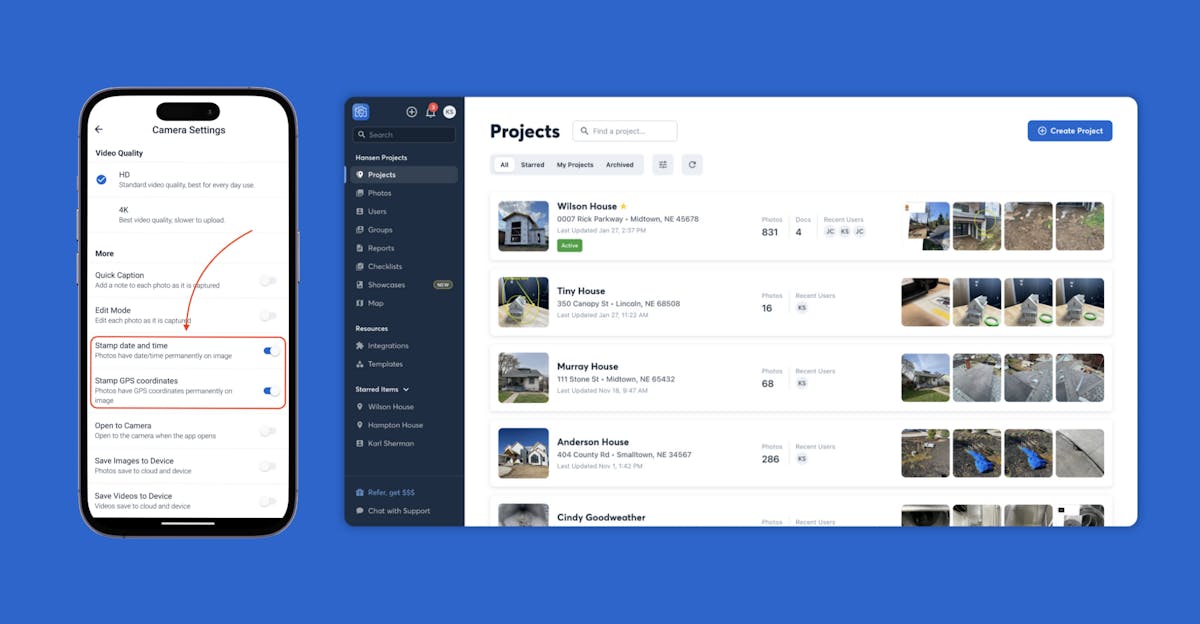
With CompanyCam, photos and videos captured in the field can sync to the project feed on mobile and web, giving field and office teams access to the same project record. Photos captured in CompanyCam are also timestamped and saved by location, adding information that helps identify when and where the image was taken.
That shared project history also gives someone who wasn’t on site a way to follow the work. Instead of searching several communication channels, they can find a photo of a particular part of the work by going back to the project where it was documented.
This becomes more useful as your company handles more jobs. A crew member may remember exactly what happened on a project they finished last week, but a searchable project record can still provide the details after that employee has worked on dozens of other sites.

How fast can you find the photo you need?
Take a look at how job photos stay with their projects in CompanyCam.
Check whether the office can find what it needs
You can test your current photo documentation process with a completed job. Choose a project from several months ago and ask someone who wasn’t on site to find a specific photo.
Make the request specific enough to require more than opening the first image they see. Ask them to find a photo of concealed work, a particular room, existing damage, a delivery, or the final condition of an area before handover.
Then check whether they can answer these questions from the documentation:
- Can they find the correct project without asking the crew?
- Can they locate the requested photo?
- Can they identify when the photo was taken?
- Can they understand what the photo shows?
- Can they tell where the work was located?
- Can they use the photo to answer the original client question?
If they struggle, look at where the process breaks down. The photos may be spread across several locations, important stages may be missing, or individual images may need more descriptions, labels, or other context.
The goal is for the relevant people in your business to access the project record and understand what happened. That keeps useful job knowledge attached to the project instead of relying on one person’s memory.
Build a photo record someone else can use
An operations leader at a switchgear and transformer contracting business described the benefit of being able to revisit older photos: “It’s very helpful because we can just go back and it’s timestamped and dated, it’s incredibly helpful.”
The useful part of a job photo is what your team can do with it later. A dated photo connected to the correct project can help answer a client question, review previous work, provide evidence of concealed installation, or confirm the condition of a site at a specific point in the project.
Your crew may already be taking the photos you need. Giving those photos a consistent home and enough context makes them useful to the rest of the business long after the job is complete.
Download The WhatsApp Trap to hear from contractors and tradespeople who were running projects through WhatsApp and what led them to change how they managed job photos.